
The CableQuit cord-cutting plan
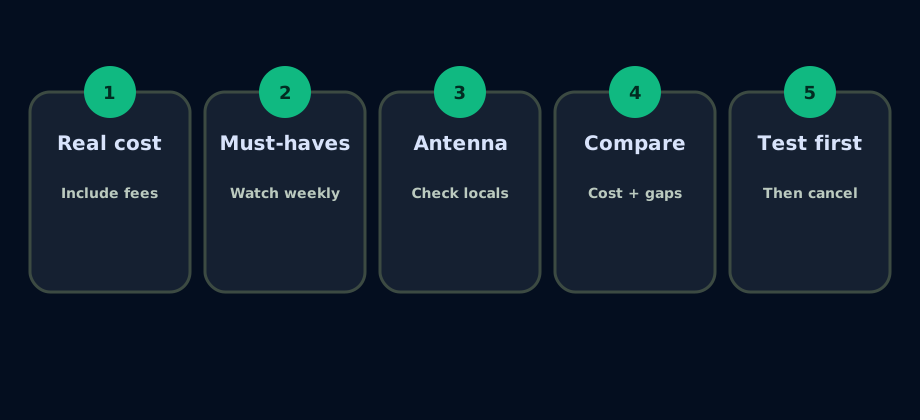
Before you cancel cable, answer these questions
| Question | Why it matters |
|---|---|
| What is your full monthly TV bill, including box or DVR fees? | This is the number your replacement setup should be compared against. |
| Which channels do you watch every week? | It keeps you from paying for programming you do not use. |
| Do you need live sports? | Sports can determine whether a live TV service is necessary. |
| Do you watch local network stations? | An antenna may reduce recurring costs if reception is reliable. |
| Which streaming apps do you already pay for? | Existing subscriptions should be separated from new switching costs. |
| Do you need DVR or multi-room viewing? | An antenna DVR such as Tablo may be relevant. |
CableQuit test scenario: separate new spending from services you already own
Scenario reviewed August 20, 2026. Consider an illustrative household paying $185 per month for cable and already paying for two on-demand apps. Their weekly must-haves are local news, ESPN, one entertainment channel, and a few specific shows. The useful comparison is not cable versus the advertised price of one streaming service. It is cable versus the complete replacement: live channels, any newly required apps, and one-time equipment.
First, the household lists the services it already pays for. Those subscriptions belong in the total setup cost, but they are not new switching expenses. Next, it compares a broad live TV plan against a smaller live package plus an antenna. Finally, it identifies anything still missing. This prevents a low headline price from hiding add-ons or uncovered channels.
The decision is made from three numbers: total setup cost, services already being paid for, and estimated new monthly spending. CableQuit uses the same distinction on results so a household can compare the real change to its budget rather than counting an existing subscription twice.
Illustrative replacement worksheet
| Line item | What to record | Why it belongs |
|---|---|---|
| Current TV cost | $185 cable bill | The full baseline, including TV equipment fees. |
| Existing apps | Apps already paid for | Part of total viewing cost, but not new spending caused by switching. |
| New live service | Plan plus required add-ons | The recurring expense needed for live channels or sports. |
| Local channels | Live service or tested antenna | A reception estimate alone is not enough to cancel cable. |
| Missing items | Channels, sports, or programs not covered | A cheaper plan is not a fit if it omits something essential. |
Example only. Use current provider prices and your household's actual subscriptions.
Do you need live TV or only the programs?
Keep a live TV path when...
- You watch sports, breaking news, or scheduled events as they happen.
- A specific live channel feed matters more than a library of related shows.
- Your household values channel surfing or one cable-like guide.
Try an on-demand path when...
- You usually watch episodes later and do not care about the channel schedule.
- You can name the programs you want but rarely watch the rest of the network.
- You are comfortable confirming each title in the app before switching.
Test week: the safest way to cancel cable
Run the proposed replacement for at least several ordinary viewing days before cancelling. Open every television, check the household's busiest viewing time, test live sports or news, confirm local stations, and make sure everyone can use the remote and guide. A plan that works on paper but fails during the household's normal routine is not ready.
- Verify each must-have channel in the provider's current ZIP-code lineup.
- Play every existing and newly recommended app on the devices you will use.
- Test simultaneous viewing if more than one person watches at once.
- Confirm DVR or recording behavior for the programs you actually record.
- Keep a short list of anything missing before making the cancellation call.
Common cord-cutting mistakes to avoid
Canceling too soon
- Test your replacement setup before canceling cable.
Assuming antenna certainty
- Local reception depends on address, placement, terrain and towers.
Missing sports details
- Live TV plans may not include every sports channel or regional network.
Ignoring promotions
- Temporary discounts should be compared separately from regular pricing.
Overlapping subscriptions
- Avoid paying for apps that duplicate what you already watch elsewhere.
Forgetting features
- Consider DVR, multi-room viewing and device compatibility.